top of page
Header Image.jpg

Due to a new Roblox policy residents of the UK or Australia are no longer able to use third-party blueprints in their parks. They can also no longer upload and submit blueprints to the TPT2 Workshop

Advertising helps fund the Theme Park Tycoon 2 Workshop and allows us to bring you this service free of charge!

Thijmen's Tilt-Track Coaster [UPDATED]

  • Jul 9
  • 1 min read

by Thijmen0808


Design ID:

UPDATED ID: RD-817-314-606-170


Blueprint Information:

Corkscrew Coaster

$277,705

  • Disable Collisions

  • Extra Colors

  • Ride Operations


How To Use:

The easiest way to load in blueprints is to simply copy the Design ID above and paste it into the Theme Park Tycoon 2 search bar! Using this technique, TPT2 will find the ride used and load it in automatically for you


Notes:

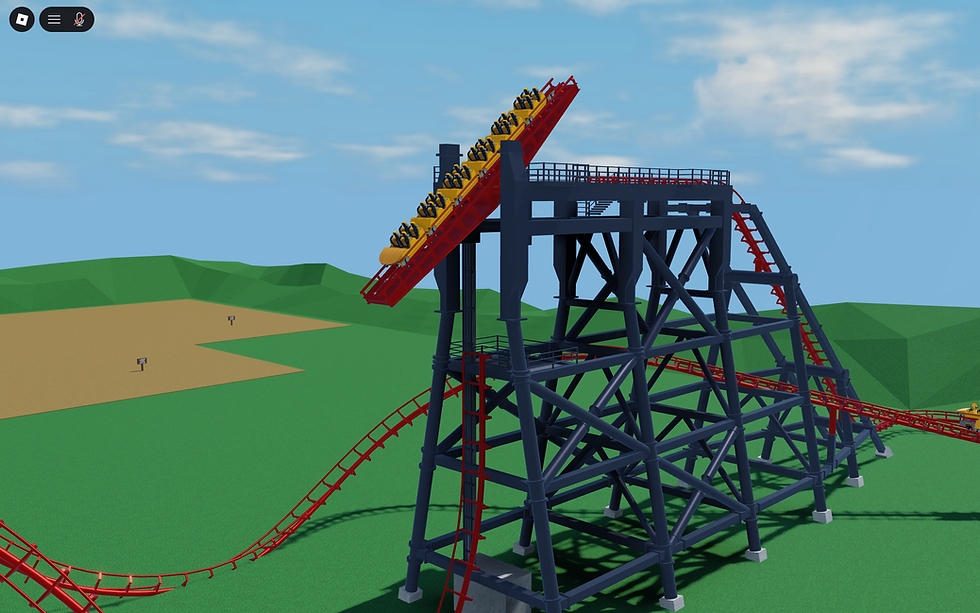
I have updated the blueprint so it features the brand new Tilt Tracks! The pictures have not been updated. But the structure has now been fitted with the new tilt track.

9 Comments

Rated 0 out of 5 stars.
No ratings yet

Add a rating

nao consgo colocar nao entra fica bugado qualquer brinquedo que coloco no jogo nao entra


Like

Esam Salh
Aug 07
Rated 5 out of 5 stars.

"Amazing build! The Tilt-Track integration really takes the realism to the next level. Thanks for sharing the updated ID! I’ve been using tools from Toolrar lately to optimize my own projects, and it's been a game-changer. Keep up the great work with these designs!"

Like

R Kirsch
Jul 22
Rated 1 out of 5 stars.

The coaster floats off the ground.

Like

MKFan31
MKFan31
Jul 16
Rated 5 out of 5 stars.

The photo and video are a bit confusing. Did you use the new tilt in the build and just an old video before it was added? (Update; you did the video 2 years ago.) I would make a new one with the new tilt being used tbh!

Edited
Like

Rated 5 out of 5 stars.

insane coaster thanks thijmen

Like

Frequently Asked

Q: Why am I getting the error "Could not load this Design-ID."


A: Players usually receive this error when they either do not have the correct gamepasses required for the blueprint they are trying to import. If you get this error, make sure you have all the gamepasses required and have disable collisions enabled (if the blueprint requires it of course)

Also ensure you are using the legacy version of the ride if the ride calls for this (information above for this)

Something Wrong?

We ensure every blueprint is working before publishing them on the TPT2 workshop but that doesn't mean mistakes don't happen! If you find an issue with a blueprint and none of the FAQs are helping you can let us know by email below with the blueprint's ID and name along with the issue you're facing

We'll make sure to take a look and get back to you as soon as possible if we're able to replicate the issue ourself!

bottom of page