top of page
Header Image.jpg

Due to a new Roblox policy residents of the UK or Australia will not be able to use third-party blueprints from October 30th. They will also be unable to upload and submit blueprints to the TPT2 Workshop

Advertising helps fund the Theme Park Tycoon 2 Workshop and allows us to bring you this service free of charge!

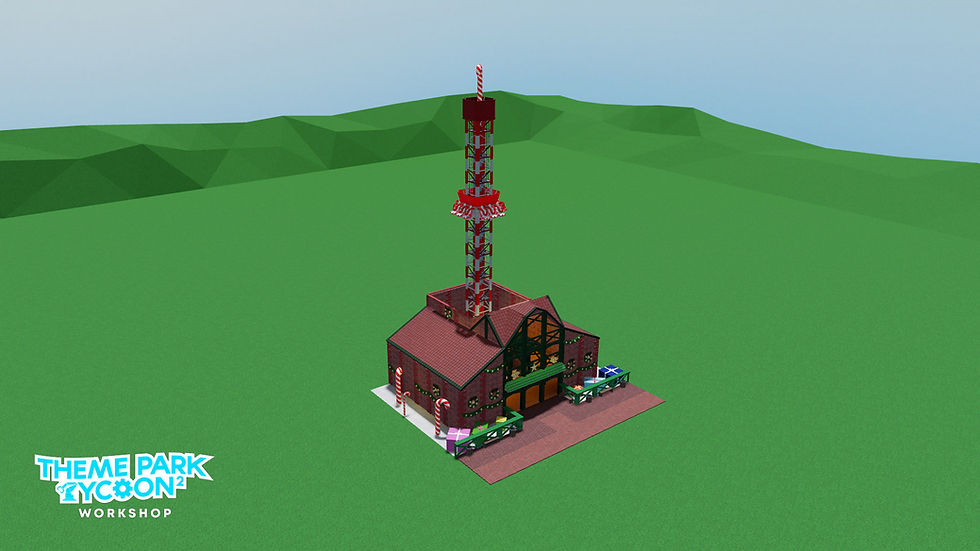
Christmas Launched Drop Tower

by LeonDerLeon


ree
ree
ree
ree

Design ID:

RD-461-562-368-427


Blueprint Information:

Ride Used

Launched Freefall Tower

Price To Build

$81,480

Gamepasses Used:

  • No Gamepasses!


How To Use:

The easiest way to load in blueprints is to simply copy the Design ID above and paste it into the Theme Park Tycoon 2 search bar! Using this technique, TPT2 will find the ride used and load it in automatically for you


Notes:

There are no notes for this blueprint

16 Comments

Rated 0 out of 5 stars.
No ratings yet

Add a rating
Jack the reaper
Jack the reaper
4 days ago
Rated 5 out of 5 stars.

I have everything for it except for the money

Like

Unknown member
6 days ago
Rated 1 out of 5 stars.

You just need gamepasses

Like

Unknown member
Oct 17
Rated 4 out of 5 stars.

I can't place down the ride cause it exceeds height limit. If you can make a shorter version of it, I could give it a 5 star. Looks cute but I am not building an underground just for that small tower.

Like

Unknown member
Feb 15
Rated 5 out of 5 stars.

if you dont have 27 blocks just dig down a bit place it then delte a few of the top parts the select the save ride then paste it on the ground

Like

Unknown member
Jan 27
Rated 3 out of 5 stars.

it looks cool and all but i can place it because it is over the height limit can u make a shorter version of it.

Like

Frequently Asked

Q: Why am I getting the error "Could not load this Design-ID."


A: Players usually receive this error when they either do not have the correct gamepasses required for the blueprint they are trying to import. If you get this error, make sure you have all the gamepasses required and have disable collisions enabled (if the blueprint requires it of course)

Also ensure you are using the legacy version of the ride if the ride calls for this (information above for this)

Something Wrong?

We ensure every blueprint is working before publishing them on the TPT2 workshop but that doesn't mean mistakes don't happen! If you find an issue with a blueprint and none of the FAQs are helping you can let us know by email below with the blueprint's ID and name along with the issue you're facing

We'll make sure to take a look and get back to you as soon as possible if we're able to replicate the issue ourself!

bottom of page